Computer Liveyour Mac live on your phone
Computer Live is a monitoring app to see your Mac's temperature on your phone, wherever you are: processor (CPU) and graphics chip temperature, processor, memory, disk, battery status and health. A Mac system monitor in your pocket, to keep an eye on a MacBook or any Mac with Apple silicon remotely. It warns you even with the app closed: Mac overheating, disk almost full, Mac switched to battery, low battery alert, Mac unreachable.
Free · no ads · no account · end-to-end encrypted
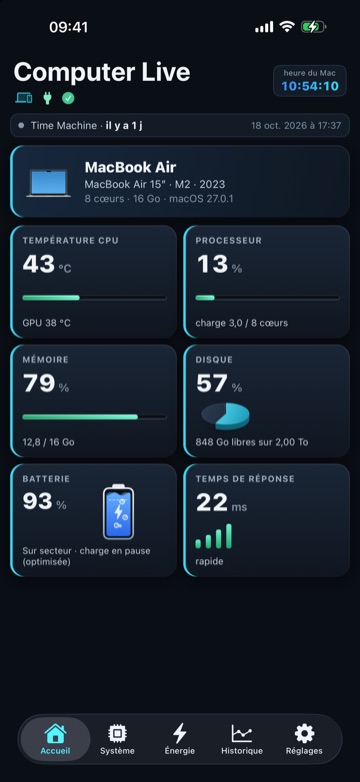
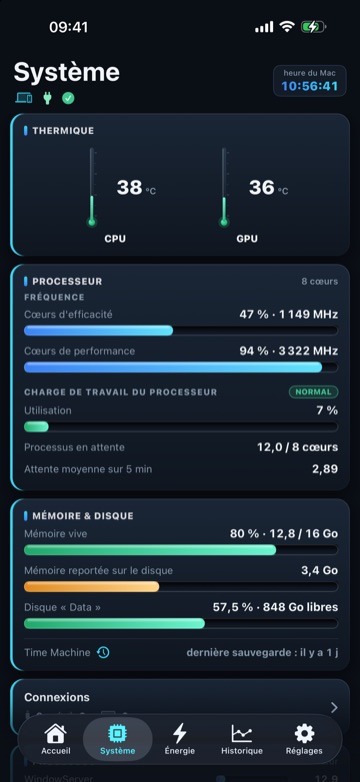
See your Mac's temperature on your phone
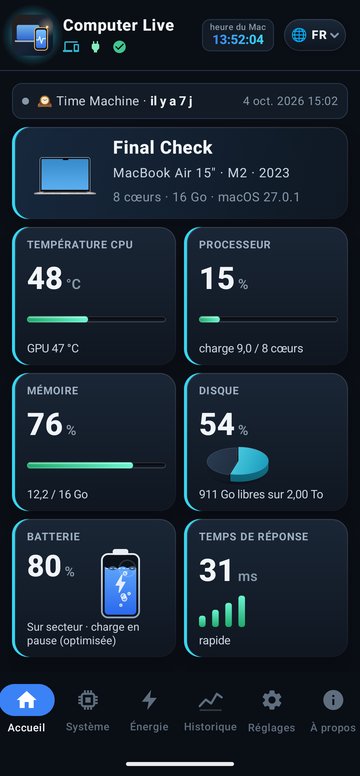
Open the app: the state of your Mac appears and updates about every two seconds.
- Temperatures of the processor and the graphics chip.
- Processor: usage, frequency of the efficiency and performance cores, load.
- Memory and disk: memory used, memory moved to disk, free space.
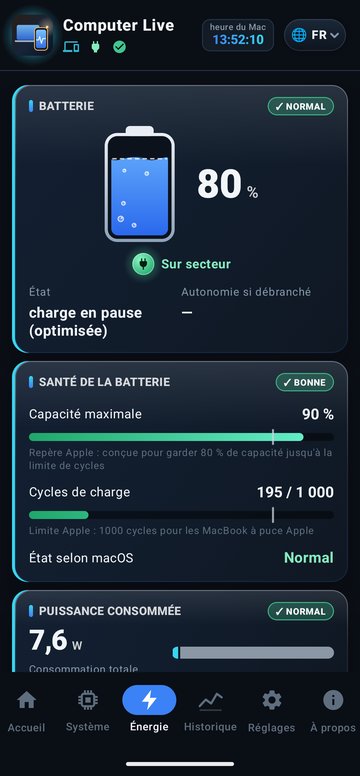
- Battery: charge, health, charge cycles, mains power, power draw.
- Time Machine: date of the last backup.
- Connections: USB devices, Bluetooth devices and displays connected; the busiest processes.
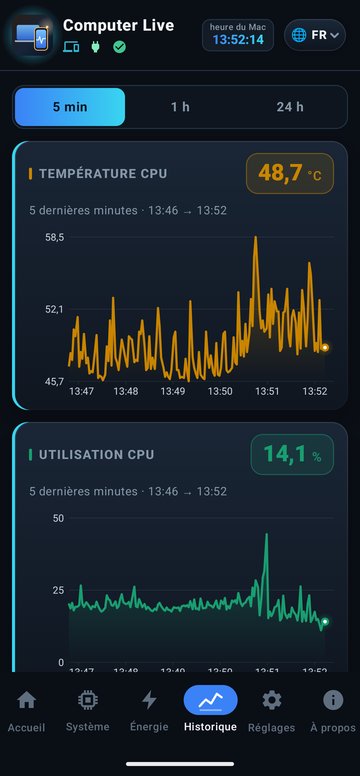
The history shows the curves for the last 5 minutes, the last hour or the last 24 hours: processor temperature, processor usage and power draw. Your Mac keeps the last 24 hours, one point per minute, and sends them when you open the app.
An alert when your Mac overheats, even with the app closed
You start a long computation, a video render or a backup, and you leave the room. Computer Live warns you on your phone:
- processor at 95 °C or more for one minute (overheating);
- disk 90 % full;
- Mac switched to battery, then battery below 15 %;
- no Time Machine backup for 30 days;
- Mac unreachable, then back online.
Two free parts: the phone app and the companion for Mac
The phone displays; the Mac measures. On the Mac, the small free program Computer Live reads the sensors and sends the encrypted readings. It has no window: just an icon in the menu bar.
- Install the phone app: Computer Live on Google Play (Android).
- Install the companion on the Mac: download Computer Live, open the .dmg file, drag Computer Live to Applications, then open it.
- Link the two: in the Computer Live menu, choose “Add a phone…”, then scan the QR code with the phone app.
Companion for Mac: 2.1 MB .dmg file, signed and notarized by Apple, updated automatically. Mac with Apple silicon (M1 or later), macOS 14 or later.
On Android and on iPhone
On Android, the app is called Computer Live Remote Monitor (formerly Mac Live, Android 10 or later, Google Play). On iPhone, it is called Computer Live Remote Monitor (iOS 17 or later): it is not yet available on the App Store. Both show the same readings and send the same alerts, with the same Computer Live companion on the Mac.
Your readings stay encrypted
- No account, no sign-up.
- No ads, no usage analytics.
- End-to-end encryption (AES-256-GCM): the relay that carries the readings cannot read them.
- The keys are exchanged only through the QR code and stay on your Mac and your phone.
The details are in the privacy policy.
Frequently asked questions
Is Computer Live free?
Yes. The phone app and the Computer Live companion for Mac are free, with no ads and no account. A donation is possible; no feature is reserved for donors.
Does the phone need to be on the same Wi-Fi as the Mac?
No. The readings go through a relay on the internet: you see your Mac from the office, while travelling or from another room. The Mac and the phone simply need to be connected to the internet.
Which Macs are compatible?
Macs with Apple silicon (M1 or later) running macOS 14 or later: MacBook Air, MacBook Pro, iMac, Mac mini, Mac Studio. Macs with an Intel processor are not supported.
When does Computer Live send an alert?
When the processor stays at 95 °C or more for one minute, when the disk is 90 % full, when the Mac switches to battery or drops below 15 %, after 30 days without a Time Machine backup, and when the Mac stops responding and then comes back online. Alerts arrive even with the app closed.
Can Computer Live take control of the Mac?
No. Computer Live shows the state of the Mac and warns you, nothing more: it does not control the Mac, does not see its screen and does not open any file.
Who can read my Mac's readings?
Only your phone. The readings are end-to-end encrypted (AES-256-GCM) with a key exchanged through the QR code; the relay that carries them cannot read them.
Is Computer Live available on iPhone?
Yes, under the name Computer Live Remote Monitor, for iOS 17 or later. It is not yet available on the App Store; in the meantime, the Android app Computer Live is on Google Play.